Screen Recorder от Bernard
Record your computer's screen with just one click!
18 078 пользователей18 078 пользователей
Метаданные расширения
Скриншоты
Об этом расширении
Screen Recorder addon helps you record video from the computer's screen.
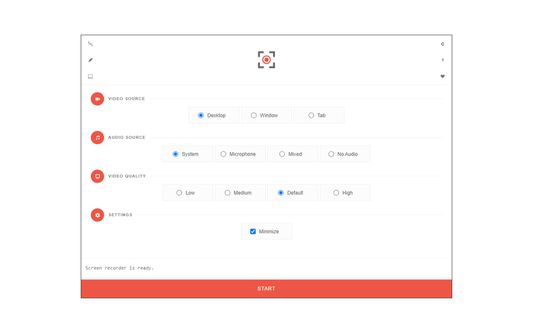
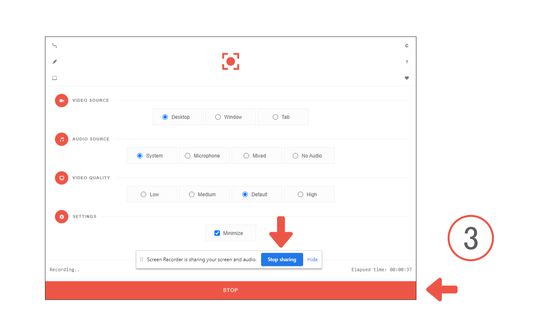
To work with this addon, please click on the toolbar button. Once the recorder interface appears, please adjust desired options, and then click the - Start - button. The video source could be your screen, window, or tab. The audio source can be the system's audio, microphone, mixed, or no audio at all. When you click the start button, a popup will appear within the interface. This popup window allows you to select the desired screen, tab, or window. To start recording please click on the - Share - button. When you are done recording the screen, please press the toolbar button (or the stop button on the app interface) to stop the recording process. The recorded video will be download to your computer automatically (on the default download location).
By default, recorded media is in - webm - format. To get more information about webm video format, please visit this Wikipedia page (https://en.wikipedia.org/wiki/WebM). If you want to change this format to a different one, please use a different software.
Note: currently in Firefox, recording the audio is not supported. "navigator.mediaDevices.getDisplayMedia" API, does not have audio capabilities. In the future, if this capability is added to the API, it will be included in the addon automatically.
To report bugs, please fill the bug report form on the addon's homepage.
To work with this addon, please click on the toolbar button. Once the recorder interface appears, please adjust desired options, and then click the - Start - button. The video source could be your screen, window, or tab. The audio source can be the system's audio, microphone, mixed, or no audio at all. When you click the start button, a popup will appear within the interface. This popup window allows you to select the desired screen, tab, or window. To start recording please click on the - Share - button. When you are done recording the screen, please press the toolbar button (or the stop button on the app interface) to stop the recording process. The recorded video will be download to your computer automatically (on the default download location).
By default, recorded media is in - webm - format. To get more information about webm video format, please visit this Wikipedia page (https://en.wikipedia.org/wiki/WebM). If you want to change this format to a different one, please use a different software.
Note: currently in Firefox, recording the audio is not supported. "navigator.mediaDevices.getDisplayMedia" API, does not have audio capabilities. In the future, if this capability is added to the API, it will be included in the addon automatically.
To report bugs, please fill the bug report form on the addon's homepage.
Оценено 52 рецензентами на 2,6
Разрешения и данные
Опциональные разрешения:
- Загружать файлы, а также читать и изменять историю загрузок браузера
Больше сведений
- Ссылки дополнения
- Версия
- 0.2.2
- Размер
- 65,41 КБ
- Последнее обновление
- 4 месяца назад (12 авг. 2025 г.)
- Связанные категории
- Лицензия
- Публичная лицензия Mozilla 2.0
- История версий
- Добавить в подборку
Разработчик этого расширения просит вас помочь поддержать его дальнейшее развитие, внеся небольшое пожертвование.