
Video Speed Controller per codebicycle
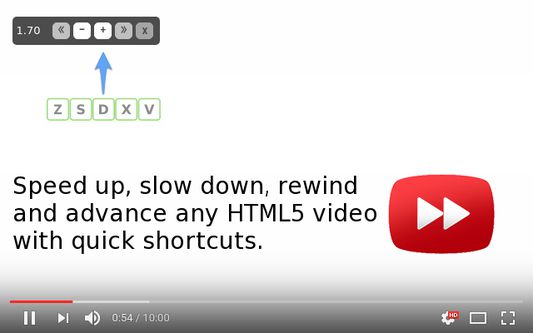
Speed up, slow down, advance and rewind any HTML5 video with quick shortcuts.
105.283 Usatores105.283 Usatores
Metadatos del extension
Capturas de schermo
A proposito de iste extension
Faster HTML5 Video
HTML5 video provides native APIs to accelerate playback of any video, but most implemented players either hide or limit this functionality. This extension fixes that, plus more...
It will help you optimize your video viewing by allowing you to make quick playback speed adjustments, as well as rewind the video to hear the last few second one more time. We don't read at a constant speed, and we talk much slower than we read - there is no reason why we have to listen at a constant speed and at a (very) slow rate.
Once the extension is installed simply navigate to any page that offers HTML5 video, and you'll see a speed indicator in top left corner of the video player. Hover over the indicator to reveal the controls to accelerate, slowdown, or rewind the video. Or, even better, use your keyboard:
S - decrease playback speed.
D - increase playback speed.
R - reset playback speed.
Z - rewind video by 10 seconds.
X - advance video by 10 seconds.
V - show/hide controller.
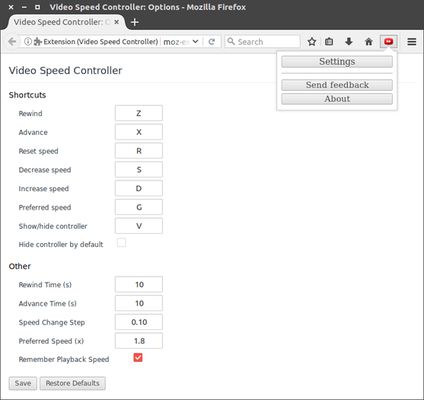
If you prefer other shortcuts, want to change the increment value, or want the player to remember your playback speed in the future, head into the settings page and customize it to your heart's content.
HTML5 video provides native APIs to accelerate playback of any video, but most implemented players either hide or limit this functionality. This extension fixes that, plus more...
It will help you optimize your video viewing by allowing you to make quick playback speed adjustments, as well as rewind the video to hear the last few second one more time. We don't read at a constant speed, and we talk much slower than we read - there is no reason why we have to listen at a constant speed and at a (very) slow rate.
Once the extension is installed simply navigate to any page that offers HTML5 video, and you'll see a speed indicator in top left corner of the video player. Hover over the indicator to reveal the controls to accelerate, slowdown, or rewind the video. Or, even better, use your keyboard:
S - decrease playback speed.
D - increase playback speed.
R - reset playback speed.
Z - rewind video by 10 seconds.
X - advance video by 10 seconds.
V - show/hide controller.
If you prefer other shortcuts, want to change the increment value, or want the player to remember your playback speed in the future, head into the settings page and customize it to your heart's content.
Valutate 4,5 per 782 revisores
Permissiones e datos
Plus de informationes
- Ligamines del additivo
- Version
- 0.6.3.3
- Dimension
- 64,62 KB
- Ultime actualisation
- לפני 5 שנים (6 אפר׳ 2021)
- Categorias associate
- Licentia
- Licentia MIT
- Historia de versiones
- Adder al collection