Full Page Screen Capture — FireShot troch TruePage
FireShot is a Full page screen capture tool that also captures Visible area, or precise Selection even that extend beyond the screen — unlike the standard tool. Fast, simple, private, offline, reliable for browsing, research, work, and documentation.
168.185 brûkers168.185 brûkers
Metadata útwreiding
Skermôfbyldingen
Oer dizze útwreiding
FireShot helps you:
• Save receipts, tickets, and order confirmations
• Capture long articles, research, and documentation
• Share design reviews, bug reports, and product ideas
• Keep permanent records of web pages that may change or disappear
Performs full page screen capture. Saves screenshots to PDF with live links and text* or images.
🔒 Instant screenshots are stored locally, and never leave your computer, so it's 100% safe for storing a sensitive information. FireShot can work offline.
No spyware and unnecessary permissions - you're just in a couple of clicks away from an ideal screenshot.
🏆 Awarded as "The Best Free Google Chrome Extension" by PCMAG․COM
Top 7️⃣ key features:
Why users choose FireShot over built-in screenshot tools
An upgrade is available. Activate it directly from the menu and unlock the following functionality:
Get FireShot for the other browsers:
Chrome and chromium-based: https://chrome.google.com/webstore/detail/capture-webpage-screensho/mcbpblocgmgfnpjjppndjkmgjaogfceg
Edge: https://microsoftedge.microsoft.com/addons/detail/take-webpage-screenshots-/fcbmiimfkmkkkffjlopcpdlgclncnknm
Safari: https://apps.apple.com/app/full-page-screen-capture/id1541862561
(*) FireShot Pro - getfireshot․com
• Save receipts, tickets, and order confirmations
• Capture long articles, research, and documentation
• Share design reviews, bug reports, and product ideas
• Keep permanent records of web pages that may change or disappear
Performs full page screen capture. Saves screenshots to PDF with live links and text* or images.
🔒 Instant screenshots are stored locally, and never leave your computer, so it's 100% safe for storing a sensitive information. FireShot can work offline.
No spyware and unnecessary permissions - you're just in a couple of clicks away from an ideal screenshot.
🏆 Awarded as "The Best Free Google Chrome Extension" by PCMAG․COM
Top 7️⃣ key features:
- Full page screen capture — entire page, visible area, or a scrolling selection
- Save as PDF with clickable links, PNG, or JPEG
- Automatically capture all tabs to PDF or image 🔥
- Provide a list of URLs for an automatic batch capturing process 🔥
- Send screenshots to GMail or clipboard or Print
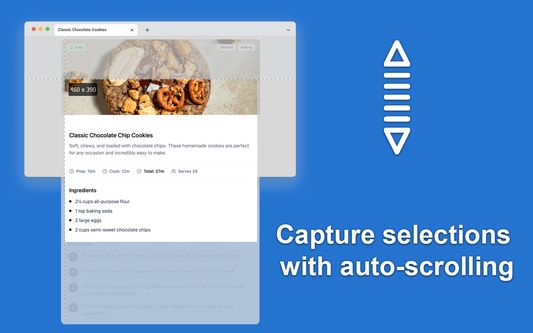
- Select and capture web page regions with auto-scrolling including off-screen content
- Lightweight screen capture extension with no ads and access to your personal data
Why users choose FireShot over built-in screenshot tools
- True full-page capture – no manual scrolling, stitching, or extra software.
- Better than Print Screen & Snipping Tool for websites – it captures what doesn’t fit on your monitor.
- Professional PDF export – ideal for reports, legal records, and documentation.
- Trusted website screenshot tool – installed by millions of users worldwide.
An upgrade is available. Activate it directly from the menu and unlock the following functionality:
- Professional PDFs: Multi-page support with custom headers, footers, and watermarks.
- Smart Editor: Annotate, blur sensitive info, and highlight key areas instantly.
- High-Quality Export: Unlimited captures with zero ads and crisp resolution.
Get FireShot for the other browsers:
Chrome and chromium-based: https://chrome.google.com/webstore/detail/capture-webpage-screensho/mcbpblocgmgfnpjjppndjkmgjaogfceg
Edge: https://microsoftedge.microsoft.com/addons/detail/take-webpage-screenshots-/fcbmiimfkmkkkffjlopcpdlgclncnknm
Safari: https://apps.apple.com/app/full-page-screen-capture/id1541862561
(*) FireShot Pro - getfireshot․com
Wurdearre: 4,6 troch 2.578 beoardielers
Tastimmingen en gegevens
Fereaske machtigingen:
- Berjochten mei oare programma’s as Firefox útwikselje
- Bestannen downloade en downloadskiednis fan de browser lêze en oanpasse
- Jo gegevens foar alle websites benaderje
Opsjonele machtigingen:
- Gegevens op it klamboerd pleatse
- Browserljepblêden benaderje
Mear ynformaasje
- Add-on-keppelingen
- Ferzje
- 1.12.18
- Grutte
- 10,95 MB
- Lêst bywurke
- 3 jierren lyn (5 jun. 2023)
- Lisinsje
- Custom License
- Privacybelied
- It privacybelied foar dizze add-on lêze
- Ferzjeskiednis
- Tafoegje oan kolleksje
De ûnwikkeler fan dizze útwreiding freget om stipe foar de trochgeande ûntwikkeling troch it meitsjen fan in lytse bydrage.
We appreciate your engagement. For quick and effective help with any technical issues, please use our official support forum:
https://getfireshot.com/sup
This helps us keep discussions here focused on the FREE version of FireShot.
Thank you for your cooperation!