Page Saver WE screenshot capture tool tekijä Kathleen Brade, Mark Smith
Quickly and easily capture an image of a web page. Options allow you to control output format (PNG or JPEG), file name and more.
7 162 käyttäjää7 162 käyttäjää
Laajennuksen metatiedot
Kuvakaappaukset
Tietoja tästä laajennuksesta
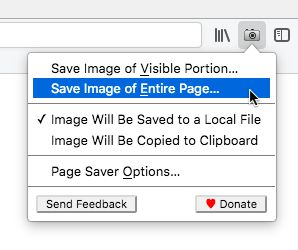
Page Saver WE lets you capture images of web pages and save them to a file in PNG or JPEG format, or to the system clipboard. Using Page Saver, you can capture a web page screenshot of an entire page or just the visible portion. To allow you to control the image capture process, a variety of options are provided including a file name pattern and support for an optional header and footer.
To begin using Page Saver WE, click the camera icon on your Firefox toolbar or press Alt+Shift+I (Linux and Windows) or ⌘+Shift+I (macOS).
Please Note: Due to restrictions Firefox imposes on extensions, Page Saver WE cannot capture images of internal Firefox pages such as about:addons or Mozilla hosted pages such as https://03.aihedy.com/.
Questions? Contact the developers by sending email to support@pearlcrescent.com
To begin using Page Saver WE, click the camera icon on your Firefox toolbar or press Alt+Shift+I (Linux and Windows) or ⌘+Shift+I (macOS).
Please Note: Due to restrictions Firefox imposes on extensions, Page Saver WE cannot capture images of internal Firefox pages such as about:addons or Mozilla hosted pages such as https://03.aihedy.com/.
Questions? Contact the developers by sending email to support@pearlcrescent.com
Arvio 4,4 88 arvostelijan toimesta
Käyttöoikeudet ja data
Vaaditut käyttöoikeudet:
- Vie tietoja leikepöydälle
- Lataa tiedostoja, sekä lue ja muokkaa selaimen lataushistoriaa
- Pääsy tietoihisi kaikilla verkkosivuilla
Lisätietoja
- Lisäosan linkit
- Versio
- 0.8.2
- Koko
- 103,28 kt
- Viimeksi päivitetty
- kolme vuotta sitten (27. heinä 2022)
- Lisenssi
- Page Saver License
- Versiohistoria
- Lisää kokoelmaan
Tämän laajennuksen kehittäjät pyytävät taloudellista tukeasi laajennuksen kehityksen jatkamiseksi.